


however, as someone who watches temps closely on my server and especially on my old PC, I can’t confirm that a site causes a dramatic rise in temps
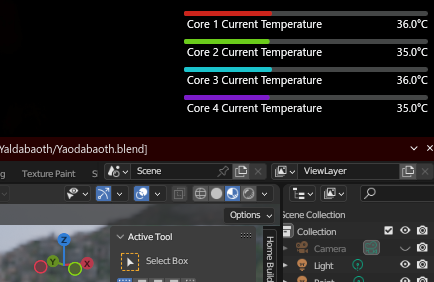
I use a KDE widget (System Monitor sensor) seen in the screenshot. It’s kept on my primary screen, right next to the clock, so I can watch the CPU temps as closely as possible. I also have a secondary widget at the drawer, displaying the CPU usage, as well as RAM and swap usage.
Notice, in the screenshot, how I’m running Blender and, yet, my CPU temps are somewhere around 35-40C. Partly because it’s currently winter here in Southern Hemisphere (and it’s quite cozy-cold around here where I reside), partly because it’s just Blender and a couple of lightweight websites opened in Waterfox. Even Catodon, the Misskey-fork platform I use for interacting with the Fediverse, is quite lightweight, especially because I turned off heavy JS animations.
But this scenario would change if I was faced with a sudden Anubis or Cloudflare. Because I watch the temps and they update each second, I can readily notice the temps increasing as Anubis/Cloudflare do their shenanigans.
Sometimes I’m browsing the Fediverse while awaiting for Blender to finish the rendering of an animation/scene. The rendering itself doesn’t warm my CPU too much, as I can adjust the thread count for Blender, but SharedWorkers in JS can take as much cores as they want because they can be instantiated multiple times, e.g. one for each CPU core. So, if Blender is opened, the temp increase can be higher, because there would be two simultaneous heavy computations competing for CPU cores. And, as I mentioned in my previous reply, the situation gets more dangerous during summer (although I avoid putting my laptop into heavy computing situations during summer).

The amount of time which Anubis and other PoW-based algorithms take to solve a cryptographic challenge will depend on several factors, namely: the challenge level (depending on the webmaster’s settings, the level can be increased if site traffic has increased), the CPU clock speed and amount of CPU resources available for your browser (and, by extension, for Anubis’ ServiceWorkers), as well as… luck. It’s dealing with randomness, after all.
Not to mention how a desktop CPU, even when old (and especially when old, as it likely means a standard big ATX rather than a mini-ITX), has lots of surface area to dissipate heat, and a metal PC case built for radiating the heat away while allowing for better internal circulation of air (contrasted with the non-conductive plastic case from cheap laptops such as the one I own).
Yeah. And in my case it’s a very inefficient, old fan. One that makes louder noise (akin to a car engine idling or cranking) as soon as it gets faster trying to keep up with the CPU heat… Oh, and I forgot to mention this in my previous replies: I also know when my CPU temps raised because the cooling fan becomes more noisy.
We often underestimate how much computing power the Web have been demanding from our personal devices. Web browsers have became full-fledged Operating Systems inside whatever Operating System the user uses, and some websites are massive in terms of CPU and RAM requirements. I mean, nowadays we have video editors, graphic suites, 3D suites, even 3D games, running entirely in browser…
!selfhosted@lemmy.world