OOhh ouch, that sucks ass… If I didn’t have Gigabit synchronous at the source there is no way I would even attempt replciation…I’d be carrying spare drives with me every time I go down to visit my grandson. ;-)
- 1 Post
- 23 Comments
Joined 5 days ago
Cake day: June 28th, 2026
You are not logged in. If you use a Fediverse account that is able to follow users, you can follow this user.
I brought the two into the same room for the initial sync…then drove the T630 to the condo and hooked up, and it’s all incremental updates over the 1G VPN. :)
 6·15 hours ago
I just use OpenVPN on Ubiquiti to get in front the outside myself, and “public” sites (like this one) come in through a cloudflare tunnel to a walled-off DMZ lan…
Reading about it, seems a bit like reinventing the wheel.
I have 120TB in a dell T630 at a condo i rent on the other side of the state… I replicate some Truenas volumes and proxmox backups to over VPN…an “in case the house burns down” kind of thing…
What he said. DF won’t take into account the contents of mount points within a directory.
What he said. DF won’t take into account the contents of mount points within a directory.
I’m in Virginia - I love Washington state, spent some time in Issaquah a while back in the SeaTac area… But the last time we moved my wife told me in no uncertain terms “If you take another out of state job, you’re going alone.” (Too many years of travelling for work…)
But I’m an awesome remote worker. ;-)
Ask you’re employer if they’re hiring…or…you know…adopting. ;-)
Not gonna lie… I have some space…

So just did a couple of experiments…
sudo su -sh /home - returns permission denied errors on certain NAS subdirectories, but not a lot.
du -sh /home --summarize -returns the same errors.
du -sh --max-depth=0 - returns the same errors plus an error saying that using --max-depth=0 is the same as --summarize.
;-) for the purposes of what I was doing (creating a clip for posting) redirecting stderr to null was the best option.
But I learned a few things today, which is cool. ;-)
Now I need to try that.
SAS actually ends up being a little cheaper due to it not being as compatible with home systems… And it’s a refurb but I got lucky because smartctl showed it only had about 200 hrs of uptime reported.
I know, I just paid $500 for a 24TB SAS drive that was $250 just over a year ago.
I shred paper. ;-) After digitizing it of course. ;-)
Oddly enough, still generates errors. (There are stuff in user directories that are set to 600… so even root can’t browse/open.)
Nope, you are exactly on.
Yeah,
So Home is a separate 1.8TB NVME drive… But under home is my home directory, and under that is a half-dozen NAS mounts, including my
Plex stuff.collection of ISO images. ;-)
To be fair, all but about 2TB of that is on a NAS…but still.
For working I’m a backup and DR guy…the name was intended to be ironic. ;-)
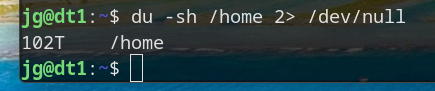
To keep the errors out and provide just the result.