

What’s the difference for a real user between using X11 or Wayland nowdays? I haven’t found anything useful on the internet, so I’m asking you. Internet articles on the topic (and about WMs too) seem to be advertising slop since they explain anything but the real things. Also, if anyone used the XLibre fork, I would love to hear about your experience with it.
That is a feature. Allowing arbitrary programs to read any key press is how you get keyloggers.
Wayland has a protocol to request reading keys out of focus (which will ask the user for permission, as opposed to just read it like on xorg).
If the program was running in xwayland (which it probably was) of course it won’t use that protocol, and will just try to read it X11 style.
In some DEs (KDE) you can select if X11 apps are allowed to read keys.
“I switched to X11 and it immediately works”. I’ll give you another tip: if you run
chmod 777 -R /the file manager stops pestering about permissions and it immediately works.Yes, you clearly understand the problem, thank you. If there’s a problem with filesystem permissions you can use tools like
chmod,chown, andsetfaclto fix them in a variety of ways.How do you fix a wayland session if your app doesn’t properly support GlobalShortcuts? Where’s the
chmod 777equivalent that lets the user say “I know this means this can spy on everything I do but I’d prefer this work today instead of waiting on a bug fix.” Without something like this, the entire desktop ecosystem needs to mature before you can call Wayland “polished.”If it’s a Wayland application it will support global shortcuts.
For X11 apps. If you are on KDE there’s this menu: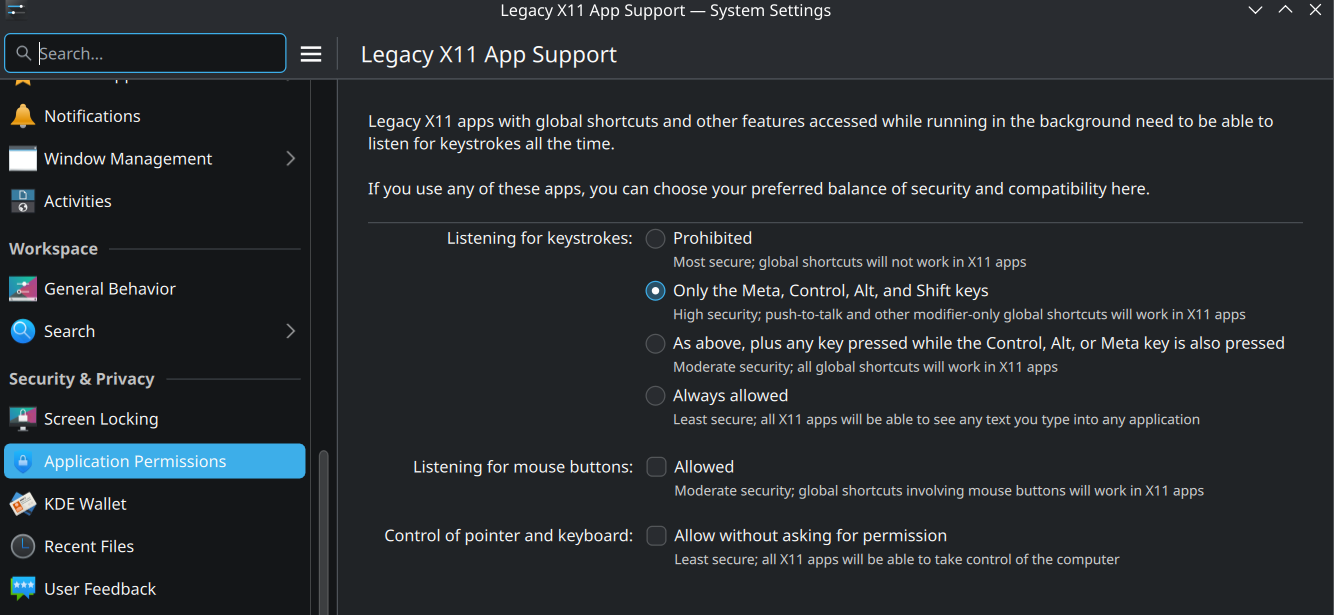
Other DEs have different ways to deal with this.
And if you are on Gnome, change DE. Gnome will always follow its own philosophy, because apparently it doesn’t align with yours, you should use something else.
Btw, I gave the same answer in the previous comment.
Also, on the “how can you consider this polished”… Wayland supports global shortcuts, this is a fact. What it doesn’t support is “global shortcuts for apps that use a protocol that is not Wayland”. I think I made my point