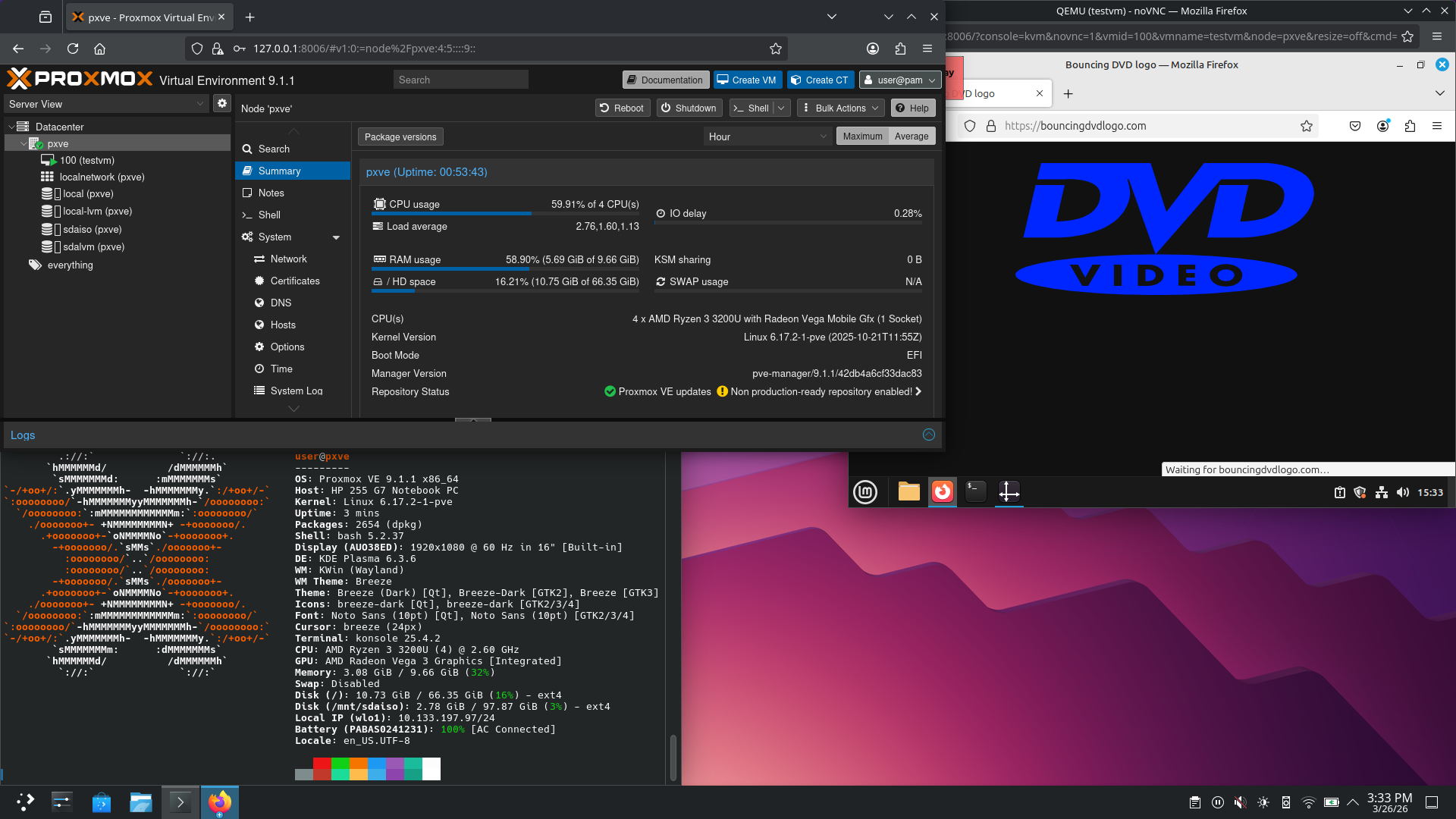
Proxmox is a virtualization platform based on Debian. It’s not supposed to have a GUI, the management is either done via web UI or SSH.
But since it basically is just Debian with some more stuff, I installed Plasma on top of it.
It is also not supposed to use WiFi since that won’t work with Linux bridges. But, after removing the adapter from /etc/network/interfaces (which gets automatically added any time I make a change through PVE web UI) and rebooting, I was able to make use of the adapter inside Plasma. And also create a bridge on proxmox, add IP to it, enable IP routing, and NAT everything coming from that subnet (used for VMs) through the WiFi adapter.
I just wish the noVNC could dynamically resize VM display like with VirtualBox after installing guest additions.
There is no use case. It can be done, that’s it. I also tried to install Proxmox on my phone under Limbo PC emulator (QEMU-based), but I couldn’t avoid random kernel panics during installation.
Also, Proxmox with 10GiB of available RAM (8+4, 2 for GPU), where the host uses up 3GiB is not really ideal. And on a weak dual-core CPU, on top of that.
Edit: But now I got an idea.
Now, there are issues. The simple solution will create multiple SSH connections that will never leave the laptop - that is - useless encryption, aside from other likely issues. The main thing is extremely easy set-up.
OK.
Thing 0: Exchange and authorize SSH keys between host and VMs.
Thing 1: Create another ext4 or whatever volume on LVM, and mount it on host (probably better to have VM with large disk - why should every VM have SSH access to host). This will be used for file sharing.
Thing 2: Mount it on all desired VMs using SSHFS.
Thing 3: Install waypipe (like ssh -X, but for Wayland) to VMs and host.
Thing 4: Create shortcuts on host desktop for desired GUI applications (which will run on VMs), prefixed by waypipe command. E.g.: waypipe -c none ssh user@debian-main.home.arpa firefox.
Waypipe works with vsock as well, which might be useful in this situation, but I have no idea how that’s used, and if it is relevant here. Based on the man page, it does sound like it though.
But anyway, mostly just a concept.
The wonderful thing about Linux is that you can do what you want. The concept of what is a “server” and what is a “desktop” has, to some degree, been peddled to us by MS and Apple. In reality, what you have here is perfectly acceptable if it works for you.
Thing 0 you can use qm terminal
Thing 1 use ZFS no need for LVM
Thing 2 see above for zfs set share nfs
Thing 3 spice vnc is built in
Thing 4 you should check out QubesOS if you haven’t already…
You should especially look at https://pve.proxmox.com/wiki/Install_Proxmox_VE_on_Debian_13_Trixie
hey there, this is really cool. please keep us updated if you have any developments on how you solve the problems, and what else you discover
Well done.